Typing is not always the fastest way to express an idea.
A message that takes several minutes to type can sometimes be spoken in seconds. The problem is that traditional voice typing often produces exactly what we say—including pauses, filler words, broken sentences and corrections.
Nothing is trying to improve that experience with Essential Voice.
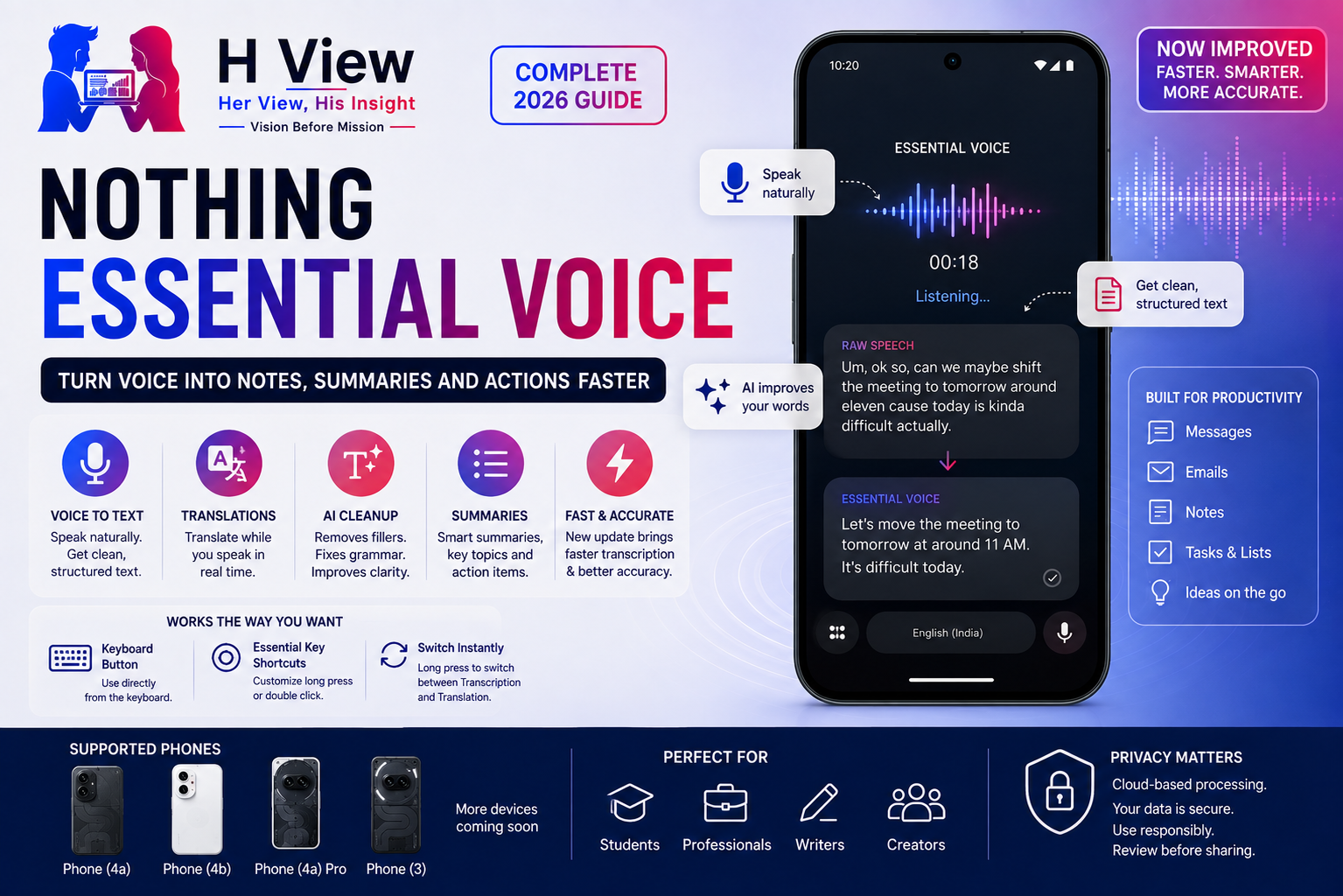
Essential Voice is designed to turn speech into cleaner, ready-to-use text rather than simply copying every spoken word. It is integrated into Nothing’s keyboard experience and, on supported phones, can also work with the physical Essential Key.
Nothing introduced the feature in April 2026 and has since started rolling out improvements focused on faster transcription, greater accuracy and easier controls.
For Nothing users, this could become one of the company’s most genuinely useful AI features—particularly for writing messages, translating speech, capturing thoughts and converting spoken ideas into structured text.
What Is Nothing Essential Voice?
Essential Voice is Nothing’s voice-to-text productivity feature.
Traditional dictation generally attempts to reproduce speech word for word. Essential Voice goes further by trying to clean up what was said before inserting it into the text field.
Nothing says it can remove filler words, correct small mistakes and structure spoken thoughts into clearer writing. It can even transform speech into formats such as lists or step-by-step instructions.
That difference matters.
Imagine saying:
“Um, okay, can you tell Ajay that the meeting, actually, maybe move it to tomorrow around eleven because today is difficult?”
Basic speech recognition might reproduce most of that sentence exactly.
Essential Voice is intended to produce something closer to:
“Tell Ajay that today’s meeting is difficult. Please move it to tomorrow at around 11 AM.”
The value is not transcription alone. It is cleaning spoken thoughts before they become written text.
Essential Voice Is Built Into the Keyboard
One of Essential Voice’s strongest ideas is that it does not require users to open a separate recorder application every time they want to dictate something.
Nothing says the feature can be accessed through a software control near the keyboard or through the Essential Key on supported phones.
That means it can potentially be used while writing in:
- Notes
- Search boxes
- Documents
- Social-media applications
- Messaging applications
- Supported text fields throughout Android
This makes it fundamentally different from recording a voice memo and transcribing it later.
Essential Voice is meant to help while you are already writing.
How to Start Essential Voice
The exact controls depend on the Nothing phone and software version.
On current supported implementations, Essential Voice can be activated from the keyboard. Nothing has also added Essential Key customisation so users can assign transcription or translation to physical-key gestures.
On Phone (4a), for example, a July 2026 update added the ability to trigger translation or transcription by double-clicking the Essential Key while the keyboard is active.
Users can configure this through:
Settings → Intelligence toolkit → Essential Voice → Customise Essential Key
Nothing also added a quick switch between translation and transcription by long-pressing the Essential Voice icon on the keyboard.
Phone (4a) Pro later received similar customisation, allowing users to decide whether a long press or double-click triggers a selected Essential Voice function.
The feature is therefore becoming more flexible rather than being tied to one fixed gesture.
Transcription Is More Than Basic Voice Typing
Essential Voice is designed to improve the structure of dictated text.
Nothing says it can reduce:
- “Um” and “uh” filler words
- Repeated phrases
- Small spoken corrections
- Fragmented sentence structure
It can also organise speech into clearer formats.
For example, you could speak:
“Things I need tomorrow: laptop charger, project file, ID card, and also call the client before ten.”
Essential Voice may be able to present that information as a cleaner list instead of one long sentence.
This is particularly valuable for users who think more naturally by speaking than typing.
Essential Voice Can Translate While You Speak
Translation is another important part of the feature.
Nothing says users can give spoken instructions such as asking the system to translate text into another language.
The July 2026 Phone (4a) update also introduced faster switching between translation and transcription directly from the keyboard.
This could help when:
- Messaging someone who uses another language
- Travelling
- Writing simple multilingual messages
- Translating short phrases
- Communicating with international colleagues
However, important translations should still be checked.
AI translation may misunderstand:
- Names
- Technical terminology
- Regional expressions
- Slang
- Context-dependent sentences
Essential Voice should therefore be treated as a convenience tool rather than an unquestionable translator.
Nothing Is Making Essential Voice Faster
The feature received a significant update in July 2026.
Nothing said Essential Voice was becoming faster and more accurate, with less waiting between speech and resulting text. The update also provided users with more control over how transcription begins.
This matters because voice interfaces fail quickly when they introduce friction.
If users speak a sentence and then wait several seconds for processing, typing begins to feel faster again.
For Essential Voice to become part of daily behaviour, it needs to feel immediate.
The July improvements suggest Nothing understands this.
Which Nothing Phones Currently Support Essential Voice?
This is where the situation becomes slightly complicated.
Nothing’s official OS release roadmap currently lists Essential Voice on selected devices, including:
- Nothing Phone (4a)
- Nothing Phone (4a) Pro
- Nothing Phone (3)
Phone (4b) launched with Essential Voice available out of the box.
Nothing initially announced the rollout schedule as:
- Phone (4a): rolling out from July 8
- Phone (4b): available out of the box
- Phone (4a) Pro: planned by the end of July
- Phone (3): planned for August
Phone (4a) Pro subsequently received an Essential Voice enhancement update on July 29.
The official roadmap also says the feature uses cloud-based processing and that Nothing is still evaluating performance, cost, scalability and user experience before confirming wider availability.
This means owners of older Nothing and CMF devices should not assume Essential Voice will automatically arrive.
Why Isn't Essential Voice on Every Nothing Phone?
Nothing has given an important explanation.
Essential Voice currently relies on cloud-based processing. The company says it is evaluating performance, operating cost and scalability before committing to wider rollout.
Cloud AI services have ongoing costs.
Every transcription or translation request may require server processing. Expanding the feature across millions of devices could therefore be significantly more expensive than distributing a normal software feature.
This may explain why Essential Voice is being introduced gradually.
It also raises an interesting question for Nothing’s future: can more of this processing eventually happen directly on the phone?
On-device processing could potentially improve:
- Privacy
- Response speed
- Offline access
- Long-term operating cost
But it may also require stronger processors and more memory.
Essential Voice vs Essential Space
These names sound similar, but they perform different jobs.
Essential Voice
Designed primarily for converting speech into usable text while working in a text field.
Think:
Speak → clean → insert text
Essential Space
Designed for capturing and organising information that you may need later.
Think:
Capture → store → organise → retrieve
Essential Space can hold screenshots, recordings, notes, images, tasks and summaries. A March 2026 update expanded semantic search across Essential Space for supported 2025–2026 Nothing and CMF devices with an Essential Key.
Cloud storage was later added so Essential Space content can be backed up and synchronised through a Nothing account across supported devices.
The two features therefore complement one another rather than compete.
Essential Voice vs Voice Notes
Voice notes are useful when you want to preserve exactly what was spoken.
Essential Voice is better when you want a polished written result immediately.
For example:
Use a voice note when:
- Recording an idea for later
- Preserving a conversation with appropriate permission
- Recording a lecture
- Capturing a long explanation
Use Essential Voice when:
- Writing a WhatsApp message
- Drafting an email
- Creating a quick list
- Filling a text field
- Translating a short message
The distinction is important.
Essential Voice is closer to intelligent dictation than a traditional recorder.
Essential Voice vs Google Voice Typing
Google’s Android keyboard already provides excellent voice typing.
That creates an obvious question: why does Nothing need Essential Voice?
Google voice typing is primarily designed to recognise spoken words accurately.
Nothing is trying to differentiate Essential Voice through post-processing and structure.
The feature can attempt to remove filler language, improve sentence flow and interpret instructions about how the output should be formatted.
That could make it more valuable for people who speak naturally rather than carefully dictating punctuation.
However, Google has decades of speech-recognition development behind it. Nothing must prove that its additional AI processing provides enough benefit to justify another voice interface.
Essential Voice vs Google Recorder
Google Recorder serves a different purpose again.
Recorder is designed primarily for capturing longer audio sessions and producing searchable transcripts.
Essential Voice focuses on real-time text creation.
A student recording an entire lecture may prefer a dedicated recording workflow.
A student replying to a professor by email may find Essential Voice faster.
The ideal tool depends on the job.
Useful for Writing WhatsApp Messages
Messaging may become one of the most natural uses of Essential Voice.
Instead of typing a long message manually, a user could speak naturally and allow the software to clean the result.
For example:
“Tell them we'll finish the homepage today, but the payment gateway needs another day because we're still testing it.”
Essential Voice could potentially convert that into a clearer professional message without requiring the user to dictate punctuation manually.
This could be particularly useful for users who frequently communicate with clients from their phones.
Useful for Emails
Email composition is another strong use case.
Typing a detailed email on a smartphone keyboard can be uncomfortable. Essential Voice could allow users to speak the main idea first and then make small manual corrections.
That may significantly reduce typing for:
- Sales professionals
- Founders
- Managers
- Freelancers
- Customer-support teams
- Field employees
However, important emails should always be reviewed before sending.
AI can improve wording while still misunderstanding intent.
Useful for Students
Essential Voice could help students create:
- Short notes
- Task lists
- Study reminders
- Questions for teachers
- Draft summaries
Speaking thoughts immediately can be especially useful after a lecture when an idea is still fresh.
It should not replace proper learning or careful note-taking, but it may reduce the friction between remembering something and writing it down.
Useful for Creators and Writers
Writers often develop ideas when they are away from a computer.
A headline may appear during a walk. A video concept may occur while travelling. A better opening paragraph might come while making coffee.
Essential Voice allows those thoughts to become structured text immediately rather than remaining inside a voice-note archive.
For H View-style workflows, it could be useful for capturing:
- Article titles
- Headline alternatives
- Social captions
- Research questions
- Video concepts
- Interview questions
The faster those ideas move into searchable text, the less likely they are to disappear.
Essential Voice and Accessibility
Voice-first interaction can also help people who find extended typing difficult.
This may include users with:
- Temporary hand injuries
- Motor impairments
- Repetitive strain discomfort
- Smaller-screen typing difficulties
A good voice interface can make a smartphone easier to use without requiring specialised applications for every interaction.
Nothing should continue improving language recognition and accessibility controls if Essential Voice is intended to become a fundamental input method.
Privacy: What Happens to Your Voice?
Privacy is one of the most important areas to understand.
Nothing’s official roadmap states that Essential Voice currently uses cloud-based processing.
This means users should assume their spoken input may need to leave the device for processing, depending on how the current implementation works.
Avoid dictating highly sensitive information such as:
- Passwords
- Banking credentials
- Confidential client data
- Medical details
- Private identification numbers
- Company secrets
Nothing should continue explaining clearly:
- Which data is uploaded
- How long audio is retained
- Which processing providers are involved
- Whether audio is stored after transcription
- How users can delete processed information
AI productivity features become trustworthy only when users understand what happens behind the interface.
Accuracy Still Depends on How You Speak
Essential Voice may improve speech recognition, but no transcription system is perfect.
Accuracy can drop because of:
- Strong background noise
- Multiple people speaking
- Regional accents
- Rapid speech
- Technical terminology
- Product names
- Indian names
- Mixed-language sentences
Nothing users in India may particularly want reliable handling of combinations such as English, Hindi and regional languages.
Any text containing:
- Money amounts
- Phone numbers
- Addresses
- Dates
- Deadlines
- Client names
should be checked carefully before sending.
Where Essential Voice Still Needs Improvement
Wider device support
Currently, only selected Nothing devices officially support the feature.
Offline processing
Cloud dependence means connectivity and operating cost remain factors.
Language transparency
Nothing should publish a simple, constantly updated list showing exactly which languages and translation pairs are supported.
Better technical vocabulary
Names, programming terminology, medical words and business-specific phrases can challenge voice systems.
Visible privacy controls
Users should be able to understand cloud processing without reading multiple policy pages.
Is Essential Voice Actually Useful?
Potentially, yes.
Essential Voice addresses a real problem: humans can often speak faster than they type, but traditional dictation produces text that still needs substantial editing.
If Nothing can reliably transform natural speech into clean, structured writing, the feature could become something users rely on every day.
Its strongest advantage is not artificial intelligence by itself.
It is removing work.
A good Essential Voice session should feel like:
Speak once → receive usable text → make one small correction → send.
If users repeatedly need to rewrite the result, the feature loses its purpose.
Frequently Asked Questions
Essential Voice is Nothing’s intelligent voice-to-text feature. It turns spoken language into cleaner written text and can remove filler words, correct small mistakes and structure information.
Nothing’s official roadmap currently identifies Phone (4a), Phone (4a) Pro and Phone (3) as supported devices. Phone (4b) launched with Essential Voice available out of the box.
Nothing currently says Essential Voice uses cloud-based processing, so users should not assume complete offline functionality.
Yes. Nothing describes translation as part of the feature, and newer Nothing OS updates allow users to switch between transcription and translation from the keyboard.
On supported phones, it can be accessed through the keyboard. Selected devices also allow Essential Key gestures to be configured for transcription or translation.
No. Essential Voice focuses on transforming speech into text. Essential Space stores, organises and retrieves captured information such as screenshots, notes and voice recordings.
Nothing has not confirmed wider availability beyond its currently listed devices. The company says it is evaluating performance, cloud-processing costs and scalability before confirming expansion.